Showing posts with label gadgets. Show all posts

Thursday, December 12, 2013

The Unstoppable Now

The universe seems to be moving forwards, ever forwards, and there's nothing we can do about it. Or is there? Is the world too tangled to unravel?

Changing political landscapes

We all see the changes in the world. Climate change is the new catchphrase for global warming. Some areas of the world may never sort themselves out: the Koreas, the Middle East, Africa. Yet we can look to the past and see how a divided Germany re-unified, how South Africa eliminated the apartheid government and changed for the better (bless you Nelson Mandela, and may you rest in peace), how Europe has bonded with common currency and economic control.

Good and bad: will Europe solidify or become an economic roller coaster? Will Africa stabilize or continue on its path of tribal and religious genocide? Will Iran become a good neighbor, or will it simply arm itself with nuclear weapons and force a confrontation with Israel?

Despotic secular regimes have been overthrown in the Islamic world (Egypt, Tunisia, and Libya) and social media seems to have become a trigger for change, a tool for inciting revolution. Some regimes are experiencing slight Islamic shifts, like Turkey. But Egypt, having moved in that direction when the Islamic Brotherhood secured the presidency, is now moving away from it in yet another revolution.

The more things change, the more they stay the same.

The reason that social media became an enabler for the changes we are seeing is because people care. Crowdsourced opinion has an increasing amount of effect on government. Imagine that! Democracy in action. Even in countries that have yet to see democracy.

Let's look at one of the biggest enablers for this: the iPhone.

The iPhone and its effect

Yes, this is one of the biggest vehicles for change because it raised the bar on handheld social media, on internet in your pocket, and on the spread of digital photography. The ability to make a difference was propagated with the iPhone and the devices that copied it. Did Steve Jobs know he was starting this kind of change? He knew it was transformative. And he built ecosystems like iTunes, the App store, and the iBookstore to make it all work. Without the App Store, we'd all still be in the dark ages of social media. The mobile revolution is here to stay.

Holding the first iPhone was like holding a bit of the future in your hands. It was that far ahead of the pack. Its amazing glass keyboard was met with skepticism from analysts at first, but the public was quick to decide it was just fine for them. A phone that was just a huge glass screen was more than an innovation. It was a revolution.

It's even remarkable that Steve Ballmer panned the first iPhone when it came out. By doing that, he drew even more attention to the gamble Apple was making, and in retrospect made himself look amazingly short-sighted. And look where it got him! Microsoft's lack of success in the mobile industry seems predictable, once you see this.

Each new iPhone iteration brings remarkable value. Better telephony (3G quickly became 4G and that quickly became LTE), better sensors (accelerometer, GPS, magnetometer, gyrometer, etc.), and better camera, lenses, flashes, and BSI sensors. Bluetooth connectivity makes it work in our cars. Siri makes it work by voice command. Each new feature is so well-integrated that it just feels like it's been there all along. Now that I have used my iPhone 5S for awhile, I feel like the fingerprint sensor is part of what an iPhone means, now.

This all-in-one device has led to unprecedented spread of pictures. It and its (ahem, copycat) devices supporting Google's Android and more recently Microsoft's Windows Phone 8 have enabled social media to become ever more present, and influential, in our world.

In 2012, a Nielsen report showed that social media growth is driven largely by mobile devices and the mobile apps made by the social media sites.

Hackers, security, whistleblowers

A battle is being fought in the field of security.

Private hackers have been stealing identities and doing so much more to gain attention, and we know why.

Then hackers began attacking companies and countries, plying their expertise, for various causes. The Anonymous and LulzSec groups fought Sony against the restrictiveness of gaming systems, against the despotic regime in Iran, against banks they believed were evil.

Enter the criminal hacking consortia, which build programs like Zeus for constructing and tasking botnets using rootkit techniques, for perpetrating massive credit card fraud.

Then the nation state hacking organizations began to do their worst. With targeted viruses like Flame, Stuxnet, and Duqu. Whole military organizations are built, like China's military unit 61398 with the sole task of hacking foreign businesses and governments.

Is anybody safe?

It is very much a sign of the times that the latest iPhone 5S features Touch ID. You just need your fingerprint to unlock it. Biometrics like fingerprints and iris scans (something only you are) are becoming a good method for security engineering. There are so many public hacker attacks that individual security is quickly becoming a major problem.

New techniques for securing your data, like multi-factor authentication, are becoming increasingly both popular and necessary. Accessing your bank and making a money transfer? Enter the passcode for your account (something only you know), then they send your trusted phone (something only you have) a text message and you enter it into the box. The second factor makes it more secure because it is more certain to be you and not some interloper spoofing you.

The landscape of security has been forever changed by the whistleblowers. Whole organizations were built to support them (WikiLeaks) and governments, banks, and corporations were targeted. The release of huge sets included confidential data from the US Military, from the Church of Scientology, from the Swiss Bank Julius Baer, from the Congressional Research Service, and from the NSA, via Edward Snowden.

It is notable that WikiLeaks hasn't released secret information from Russia or China. It is most likely that they would be collectively assassinated were that the case. Especially given such events as the death of Alexander Litvinenko.

The founder of WikiLeaks, Julian Assange, is currently a self-imposed captive in the Ecuadorean embassy in London. In an apparent coup, one of the WikiLeaks members, Daniel Domscheit-Berg decided to leave WikiLeaks, and when he left, he destroyed documents containing America's no-fly list, the collected emails of the Bank of America, insider information from 20 right-wing organizations, and proof of torture in an undisclosed Latin American country (unlikely to be Ecuador, and much more likely to be one of its adversaries, such as Colombia). Domscheit-Berg apparently left to start up his own leaks site, but later decided to merely offer information on how to set one up.

The trend is that the general public (or at least a few highly-vocal people) increasingly expect all secrets to be revealed. And yet, I expect that they would highly value their own secrets. This is why there is such a trend towards protecting individual privacy.

The reality is organizations like WikiLeaks are proud to reveal secrets from the western democracies like America, but are reticent to do so for America's adversaries like Russia. Since this creates an asymmetric advantage, these organizations can only be viewed as anti-American. Even if they aren't specifically anti-American, they inevitably have this effect.

So they are playing for the Russians whether they believe it or not.

Does the whistleblower movement have the inherent potential for disentangling the world political situation? Perhaps in the sense that knots can be cut, like the Gordian Knot. But disentangled? No.

The only way that the knots can be unraveled is if everybody begins to play nice. And I don't really see that happening.

Perhaps Raul Castro will embrace America as an ally now that we have shaken hands. Perhaps Iran will stop its relentless bunker-protected quest for Uranium enrichment. Perhaps the Islamic militias in Africa will declare a policy of live-and-let-live with their Christian neighbors and stop the wholesale slaughter.

It's good to be idealistic. In idealism, when it is peace-oriented, we see a chance for change. In the social media revolution we see a chance for the moderate majority to be heard.

Only we can stop the unstoppable now.

Sunday, October 6, 2013

Bigger Pixels

What is better? Bigger pixels or more megapixels? In this blog post, I will explain all. The answer may not be what you think it is!

Image sensors

Digital cameras use image sensors, which are rectangular grids of photosites mounted on a chip. Most image sensors today in smartphones and digital cameras (intended for consumers) employ a CMOS image sensor, where each photosite is a photodiode.

Now, images on computers are made up of pixels, and fortunately so are sensors. But in the real world, images are actually made up of photons. This means that, like the rods and cones in our eyes, photodiodes must respond to stimulation by photons. In general, the photodiodes collect photons much in the way that our rods and cones integrate the photons into some kind of electrochemical signal that our vision can interpret.

A photon is the smallest indivisible unit of light. So, if there are no photons, there is no light. But it's important to remember that not all photons are visible. Our eyes (and most consumer cameras) respond only to the visible spectrum of light, roughly between wavelengths 400 nanometers and 700 nanometers. This means that any photon that we can see will have a wavelength on this range.

Color

The light that we can see has color to it. This is because each individual photon has its own energy that places it somewhere on the electromagnetic spectrum. But what is color, really? Perceived color gives us a serviceable approximation to the spectrum of the actual light.

Objects can be colored, and lights can be colored. But, to determine the color of an object, we must use a complicated equation that involves the spectrum of the light from the light source and the absorption and reflectance spectra of the object itself. This is because light can bounce off, be scattered by, or transmit directly through any object or medium.

But it is cumbersome to store light as an entire spectrum. And, since a spectrum is actually continuous, we must sample it. And this is what causes the approximation. Sampling is a process by which information is lost, of course, by quantization. To avoid this loss, we convolve the light spectrum with color component spectra to create the serviceable, reliable color components of red, green, and blue. The so-called RGB color representation is trying to approximate how we sense color with the rods and cones in our eyes.

So think of color as something three-dimensional. But instead of X, Y, and Z, we can use R, G, and B.

Gathering color images

The photons from an image are all mixed up. Each photodiode really just collects photons and so how do we sort out the red photons from the green photons from the blue photons? Enter the color filter array.

Let's see how this works.

Each photosite is really a stack of items. On the very top is the microlens.

The microlenses are a layer of entirely transparent material that is structured into an array of rounded shapes. Bear in mind that the dot pitch is typically measured in microns, so this means that the rounding of the lens is approximate. Also bear in mind that there are millions of them.

You can think of each microlens as rounded on the top and flat on the bottom. As light comes into the microlens, its rounded shape bends the light inwards.

The microlens, as mentioned, is transparent to all wavelengths of visible light. This means that it is possible that an infrared- and ultraviolet-rejecting filter might be required to get true color. The colors will become contaminated otherwise. It is also possible, with larger pixels, that an anti-aliasing filter, usually consisting of two extremely thin layers of silicon niobate, is sandwiched above the microlens array.
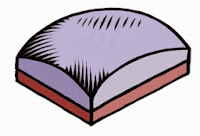
Immediately below the microlens array is the color filter array (or CFA). The CFA usually consists of a pattern of red, green, and blue filters. Here we show a red filter sandwiched below.

The CFA is usually structured into a Bayer pattern. This is named after Bryce E. Bayer, the Kodak engineer that thought it up. In this pattern, there are two green pixels, one red, and one blue pixel in each 2 x 2 cell.

A microlens' job is to focus the light at the photosite into a more concentrated region. This allows the photodiode to be smaller than the dot pitch, making it possible for smaller fill factors to work. But a new technology, called Back-Side Illumination (BSI) makes it possible to put the photodiode as the next thing in the photosite stack.   This means that the fill factors can be quite a bit larger for the photosites in a BSI sensor than for a Front-Side Illumination (FSI) sensor.

The real issue is that not all light comes straight into the photosite. This means that some photons are lost. So a larger fill factor is quite desirable in collecting more light and thus producing a higher signal-to-noise ratio (SNR). Higher SNR means less noise in low-light images. Yep. Bigger pixels means less noise in low-light situations.
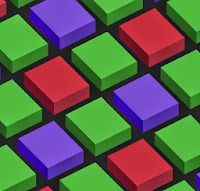
Now, the whole idea of a color filter array consists of a trade-off of color accuracy for detail. So it's possible that this method will disappear sometime in the (far) future. But for now, these patterns look like the one you see here for the most part, and this is the Bayer CFA pattern, sometimes known as an RGGB pattern. Half the pixels are green, the primary that the eye is most sensitive to. The other half are red and blue. This means that there is twice the green detail (per area) as there is for red or blue detail by themselves. This actually mirrors the density of rods vs. cones in the human eye. But in the human eye, the neurons are arranged in a random speckle pattern. By combining the pixels, it is possible to reconstruct full detail, using a complicated process called demosaicing. Color accuracy is, however, limited by the lower count of red and blue pixels and so interesting heuristics must be used to produce higher-accuracy color edges.

How much light?

It's not something you think about every day, but the aperture controls the amount of light let into the camera. The smaller the aperture, the less light the sensor receives. Apertures use f-stops. The lower the f-stop, the larger the aperture. The area of the aperture, and thus the amount of light it lets in, is proportional to the reciprocal of the f-stop squared. For example, after some calculations, we can see that an f/2.2 aperture lets in 19% more light than an f/2.4 aperture.

Images can be noisy. This is generally because there are not enough photons to produce a clear, continuous-tone image, and even more because the arrival time of the photons is random. So, the general rule is this: the more light, the less noise. We can control the amount of light directly by increasing the exposure time. And increasing the exposure time directly lets more photons into the photosites, which dutifully collect them until told not to do so. The randomness of the arrival time is less a factor when the exposure time increases

Once we have gathered the photons, we can control how bright the image is by increasing the ISO. Now, ISO is just another word for gain: a volume knob for the light signal. We crank up the gain when our subject is dark and the exposure is short. This restores the image to a nominal apparent amount of brightness. But this happens at the expense of greater noise because we are also amplifying the noise with the signal.

We can approximate these adjustments by using the sunny 16 rule: on a sunny day, at f/16, with ISO 100, we use about 1/120 of a second exposure to get a correct image exposure.
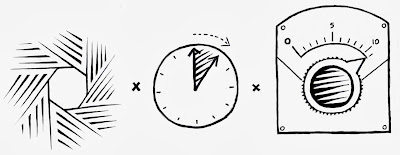
The light product is this:

(exposure time * ISO) / (f-stop^2)

This means nominal exposure can be found for a given ISO and f/number by measuring light and dividing out the result to compute exposure time.

If you have the exposure time as a fixed quantity and you are shooting in low light, then the ISO gets increased to keep the image from being underexposed. This is why low-light images have increased noise.

Sensor sensitivity

The pixel size actually does have some effect on the sensitivity of a single photosite in the image sensor. But really it's more complicated than that.

Most sensors list their pixel sizes by the dot pitch of the sensor. Usually the dot pitch is measures in microns (a micron is a millionth of a meter). When someone says their sensor has a bigger pixel, they are referring to the dot pitch. But there are more factors affecting the photosite sensitivity.

The fill factor is an important thing to mention, because it has a complex effect on the sensitivity. The fill factor is the amount of the array unit within the image sensor that is devoted to the surface of the photodiode. This can easily be only 50%.

The quantum efficiency is related to the percentage of photons that are captured of the total that may be gathered by the sensor. A higher quantum efficiency results in more photons captured and a more sensitive sensor.

The light-effectiveness of a pixel can be computed like this:

DotPitch^2 * FillFactor * QuantumEfficiency

Here the dot pitch squared represents the area of the array unit within the image sensor. Multiply this by the fill factor and you get the actual area of the photodiode. Multiply that by the quantum efficiency and you get a feeling for the effectiveness of the photosite, in other words, how sensitive the photosite is to light.

Megapixel mania

For years it seemed like the megapixel count was the holy grail of digital cameras. After all, the more megapixels the more detail in an image, right? Well, to a point. Eventually, the amount of noise begins to dominate the resolution. And a little thing called the Airy disc.

But working against the megapixel mania effect is the tiny sensor effect. Smartphones are getting thinner and thinner. This means that there is only so much room for a sensor, depth-wise, owing to the fact that light must be focused onto the plane of the sensor. This affects the size of the sensor package.

The granddaddy of megapixels in a smartphone is the Nokia Lumia 1020, which has a 41MP sensor with a dot pitch of 1.4 microns. This increased sensor size means the phone has to be 10.4mm thick, compared to the iPhone 5S, which is 7.6mm thick. The extra glass in the Zeiss lens means it weighs in at 158g, compared to the iPhone 5S, which is but 115g. The iPhone 5S features an 8MP BSI sensor, with a dot pitch of 1.5 microns.

While 41MP is clearly overkill, they do have the ability to combine pixels, using a process called binning, which means their pictures can have lower noise still. The iPhone 5S gets lower noise by using a larger fill factor, afforded by its BSI sensor.

But it isn't really possible to make the Lumia 1020 thinner because of the optical requirements of focusing on the huge 1/1.2" sensor. Unfortunately thinner, lighter smartphones is definitely the trend.

But, you might ask, can't we make the pixels smaller still and increase the megapixel count that way?

There is a limit, where the pixel size becomes effectively shorter than the wavelength of light, This is called the sub-diffraction limit. In this regime, the wave characteristics of light begin to dominate and we must use wave guides to improve the light collection. The Airy disc creates this resolution limit. This is the diffraction pattern from a perfectly focused infinitely small spot. This (circularly symmetric) pattern defines the maximum amount of detail you can get in an image from a perfect lens using a circular aperture. The lens being used in any given (imperfect) system will have a larger Airy disc.

The size of the Airy disc defines how many more pixels we can have with a specific size sensor, and guess what? It's not many more than the iPhone has. So the Lumia gets more pixels by growing the sensor size. And this grows the lens system requirements, increasing the weight.

It's also notable that, because of the Airy disc, decreasing the size of the pixel may not increase the resolution the resultant image. So you have to make the sensor physically larger. And this means: more pixels eventually must also mean bigger pixels and much larger cameras. Below a 0.7 micron dot pitch, the wavelength of red light, this is certainly true.

The human eye

Now, let's talk about the actual resolution of the human eye, computed by Clarkvision to be about 576 megapixels.

That seems like too large a number, and actually it seems ridiculously high. Well, there are about 100 million rods and only about 6-7 million cones. The rods work best in our night vision because they are so incredibly low-light adaptive. The cones are tightly packed in the foveal region, and really only work in lighted scenes. This is the area we see the most detail with. There are three kinds of cones and there are more red-sensitive cones than any other kind. Cones are usually called L (for large wavelengths), M (for medium wavelengths), and S (for small wavelengths). These correspond to red, green, and blue. The color sensitivity is at a maximum between 534 and 564 nanometers (the region between the peak sensitivities of the L and M cones), which corresponds to the colors between lime green and reddish orange. This is why we are so sensitive to faces: the face colors are all there.

I'm going to do some new calculations to determine how many pixels the human eye actually does see at once. I am defining pixels to be rods and cones, the photosites of the human eye. The parafoveal region is the part of the eye you get the most accurate and sharp detail from, with about 10 degrees of diameter in your field of view. At the fovea, the place with the highest concentration, there are 180,000 rods and cones per square millimeter. This drops to about 140,000 rods and cones at the edge of the parafoveal region.

One degree in our vision maps to about 288 microns on the retina. This means that 10 degrees maps to about 2.88 mm on the retina. It's a circular field, so this amounts to 6.51 square millimeters. At maximum concentration with one sensor per pixel, this would amount to 1.17 megapixels. The 10 degrees makes up about 0.1 steradians of solid angle. The human field of vision is about 40 times that at 4 steradians. So this amounts to 46.9 megapixels. But remember that the concentration of rods and cones falls off at a steep rate with the distance from the fovea. So there are at most 20 megapixels captured by the eye in any one glance.

It is true that the eye "paints" the scene as it moves, retaining the information for a larger field of view as the parafoveal region sweeps over the scene being observed. It is also true that the human visual system has sophisticated pattern matching and completion algorithms wired in. This probably increases the perceived resolution, but not by more than a factor of two by area.

So it seems unlikely  that the human eye's resolution can exceed 40 megapixels. But of course we have two eyes and there is a significant overlap between them. Perhaps we can increase the estimate by 20 percent, to 48 megapixels.

If you consider yourself using a retina display and then extrapolate to the whole field of view, this is pretty close to what we would get.

So this means that a camera that captures the entire field of view that a human eye can see (some 120 degrees horizontally and 100 degrees vertically in a sort of oval-shape) could have 48 megapixels and you could look anywhere on the image and be fooled. If the camera were square, it would probably have to be about 61 megapixels to hold a 48 megapixel oval inside. So that's my estimate of the resolution required to fool the human visual system into thinking it's looking at reality.

Whew!

That's a lot of details about the human eye and sensors! Let's sum it all up. To make a valid image with human-eye resolution, due to Airy disc size and lens capabilities, would take a camera and lens system about the size and depth of the human eye itself! Perhaps by making sensors smaller and improving optics to be flexible like the human eye, we can make it twice as good and half the size.

But we won't be able to put that into a smartphone, I'm pretty sure. Still, improvements in lens quality, BSI sensors, wave guide technology, noise reduction, and signal processing, continue to push our smartphones to ever-increasing resolution and clarity in low-light situations. Probably we will have to have cameras with monochromatic (rod-like) sensors to be able to compete with the human eye in low-light scenes. The human retinal system we have right now is so low-light adaptable!

Apple and others have shown that cameras can be smaller and smaller, such as the excellent camera in the iPhone 5S, which has great low-light capabilities and a two-color flash for better chromatic adaptation. Nokia has shown that a high-resolution sensor can be placed in bigger-thicker-heavier phones that has the flexibility for binning and better optics that push the smartphone cameras ever closer to human-eye capabilities.

Human eyes are hard to fool, though, because they are connected to pattern-matching systems inside our visual system. Look for image interpretation and clarification algorithms to make the next great leap in quality, just as they do in the human visual system.

So is it bigger pixels or simply more of them? No, the answer is better pixels.

Tuesday, December 25, 2012

Observing Microsoft, Part 2


Some of the most important assets a company has are its brands. A brand distinguishes a product from its competitors and can spread out like an umbrella to encompass several related products. But it must be coherent, meaningful, and inspire trust and signify value. You don't want a brand to become unclear. Brand management is a vital aspect of business.

Microsoft's main brand is Windows, an operating system. It is an umbrella brand, covering Windows 8 and Windows Server, though many people still are running Windows XP and Windows 7. The company also has the Office brand, which is an umbrella brand covering various pieces of software, like Word, Excel, PowerPoint, and Outlook. The brands specifically spell out what Microsoft is known for, and by inference what it is good at: operating systems and software.

It is abundantly clear that Microsoft is stepping out of its circle of expertise by creating hardware. It seeks to add another brand, Surface. But the Surface product is actually Microsoft Surface with Windows RT.

Let's look at the Windows brand. The billion or so Windows users are all familiar with Windows user interface. This includes such items as the taskbar, the start menu, and the desktop, with the plethora of blue-topped rectangular windows, from which the brand gets its moniker. Icons on the desktop, really just aliases to actual files, are called shortcuts.

But by creating a touch-based interface for Windows 8, really just a start-up screen veneer on desktop systems, those one billion users are led into into unfamiliar territory by the new user interface. There are reports of users being uncomfortable with the user interface and putting off the upgrade to Windows 8. Perhaps the main problem is that there are now two user interfaces, and they are quite different.

In some sense, this splits the brand, fracturing what Windows actually means. And that's not good. Furthermore, using the Windows brand on their hardware products actually stretches the Windows umbrella brand to include hardware, which has dire consequences for their OEMs like Sony, Toshiba, Acer, Asus, Dell, and HP. Reports are emerging that Dell urged Microsoft not to use the Windows brand for their Surface product. This causes confusion as to what Windows itself actually is: is it an operating system or a computer? Oh, man.

Some even claim that Microsoft is abusing the Windows brand.

All this, combined with the apparent lack of Surface sales, has investors in the same boat as the Windows user base: should they invest in Microsoft now?

Many users seem content to wait for Windows 9. There are some indications that Windows 8 could be like Windows Vista, which was met with whole-hearted scorn from users, who hung onto their prized Windows XP systems. Only with Windows 7, captained by recently-fired Steven Sinofsky, did the users finally resume their upgrades.

Arguments in favor of Microsoft's current Windows 8/Surface strategy center around three concepts. The first is, because they covet the Apple revenue model, that by integrating their software with their own hardware, they can do the same. The second is that they can't abandon the Windows brand and simultaneously they must make a move into the mobile space with it. And the third is that they are bridging the gap between tablets and laptops.

Perhaps, if they can do any one of these things right, they will survive. But right now, analysts have been noticing that PC sales have been dropping off. This is because the mobile market is disrupting it. Notice I didn't say that the tablet market is disrupting the PC market. More and more users are using mobile devices. By making their tablet more like a laptop, Microsoft doesn't really get what's happening.

The Holiday Season

The holiday season accounts for a large amount of retailers' sales annually. Indications are that online sales have surged 16% this season over last year. However, retail sales in brick-and-mortar have only risen by about 2.5%. But, to me, there is no doubt that the malls are crowded. Yesterday, it took me about 40 minutes to find a parking spot at the ValleyFair mall in Silicon Valley! This could mean that retailers are selling, but just not the big ticket items. This testifies to economic troubles or perhaps the widespread purchase of discounted items after hurricane Sandy.

The sales of Windows 8 depends partly upon the purchase of new computers. This is because those who purchase the new, exciting computers are essentially a captive audience. And if consumers (and possibly businesses) aren't buying the big-ticket items, then that could be a reason.

Let's analyze that for a moment. If computers are more expensive than tablets, then the consumers will buy tablets. Businesses will rush to construct low-cost business solutions using tablets as well because they can save on expenses - and the apps are there. And even if they aren't, the cost of developing corporation-local apps will make the conversion worth it. Nitro Mobile is one such company that specializes in creating corporation-local solutions on mobile platforms, like iOS.

Another sign that sales for Windows 8 aren't quite up to snuff is this article about Microsoft stores in the metropolitan New York Area, which states again that Microsoft stores were sparsely populated when the aisles at the mall were practically impossible to get through. In Silicon Valley, I noticed the same thing: Microsoft stores were just not filling up or selling their wares as fast as Apple stores. Perhaps Ballmer's idea of putting Microsoft stores right next to Apple stores wasn't so good after all: it invites unfavorable comparison. For PC sales to be lackluster in the holiday season is more than just a slow start. It's a definite problem. The market is changing fast.

Tuesday, December 4, 2012

Observing Microsoft

Microsoft doesn't hang quite as straight as it used to. What has happened to Microsoft? If the question is even being asked, things can't be going well.

The media are definitely asking the question. For instance, an interesting article in businessinsider asks whether Steve Ballmer's nightmare is coming true.

I don't know if it's poor execution or just the fact that Microsoft has been classically a software company (its name literally means microcomputer software) but I wonder at the missteps in their Surface strategy. We'll get to that in a moment.

I pointed to Microsoft's corporate culture in my blog post The Nail That Sticks Out. I am positive that they are fabulous about research in the ranks but at the top levels I believe their management is grimly despotic and unimaginative. In that case, what they need is a great leader. A few days ago, Microsoft CEO Steve Ballmer said, "We see nothing but a sea of upside". But they need a leader that doesn't need to boil the ocean to come up with the gold. One that has a vision for what can work. And, more importantly, what people will buy.

They need two things: focus and simplicity.

It is sad that, today, there are more than a few trends that point to the beginnings of a death spiral for Microsoft. To name a few: tablets start to eat the PC market, mobile computing succeeds for others but not for them, gigantic software bloat like Excel and Word are being replaced in the industry by small, mobile apps that cost a only a few of bucks, and companies are starting to use a Bring Your Own Device (BYOD) policy for their IT connectivity.

Individually, any of these trends would be quite bad for Microsoft. Taken together, these things are terrible.

Getting Into the Hardware Game

Microsoft's CEO Steve Ballmer laughed at, then roundly criticized the iPhone in September 2007 after it was introduced by Steve Jobs. It is clear that he simply didn't understand what was going to happen to the mobile space in a short five years.

Microsoft should have been working on Surface from that moment onwards. But clearly that didn't happen, since they only introduced Surface one month ago. To build mobile devices, Microsoft has to undergo a major transformation.

Microsoft claims that they are a hardware company. Mice and keyboards do not count. Comparing Microsoft to Apple, Dell, or HP in hardware prowess would be like comparing someone who dipped their toe into the pool with an olympic swimming champion. So that leaves the Xbox, which plugs into the wall. This doesn't exactly point to expertise miniaturizing hardware or really building any mobile computing technology. And their Xbox gaming platform is also under siege by mobile. They should never have let this happen. A whopping 61% of mobile phone owners use them for games. It is noted that iOS is the world's leading gaming platform.

So, why is Microsoft, a software company, also becoming a hardware company? Simple: both Apple and Google have the ability to craft their software and hardware together. In Apple's case, this core competence specifically led to the disruptive, record-breaking products such as the iPod, iPhone, and iPad that consumers just can't get enough of. In the process, these products and the ability to execute has led to a profit model that is unparalleled in the business and now the envy of Microsoft.

And this is exactly where Microsoft wants to be: back on top.

Which means they must build hardware so they can create the whole product. Microsoft knows from experience that their OEMs willfully do what they want. And lag behind Microsoft's wishes and suggestions. Furthermore, the developers will have a larger set of hardware configurations to support. This has always been a problem with Windows: its generality. And it is the current problem with Android. If Microsoft wants to take a page from Apple, it must control the hardware configuration as well.

Microsoft's act of angering the OEMs by creating its own home-grown hardware is dangerous and can backfire on its revenue stream. For one thing, this doesn't build on its core competence. In retrospect it might have been better to take the Google approach and simply buy one of the OEMs, perhaps Sony or HP. Still, Microsoft clearly knows that mergers are not an easy process so it foolishly started building hardware.

Windows 8

Microsoft says they sold some 40 million licenses (hologram stickers). So Windows 8 is going great, right? Well, no. Firstly, this only represents Windows 8 PCs that have been shipped to retailers or distribution points, not end-user licenses (I can't believe they don't report end-user licenses!). Secondly, StatCounter reports that the Windows 8 usage share is falling behind Windows 7 in a comparable period from the launch. At only about 33% of Windows 7 usage, Windows 8 usage is in a serious lag. The firm NetApplications is telling the same story. Perhaps this is the effect of hurricane Sandy, as they said. But it's already one full month since the October 26th launch (and the hurricane). Things should have equalized by now.

On Black Friday, the busiest shopping day of the year, I would have expected the new, exciting Microsoft Surface RT to be a top seller, fulfilling several weeks of pent-up demand. Indications are just the opposite. When I have thrice visited the Microsoft and Apple stores in the Santa Clara Valley Fair mall since, I have consistently seen that customers in the Apple store outnumber those in the Microsoft store at least two-to-one. Though I did see my first Microsoft bag yesterday, being carried by a woman in Nordstrom.

Another force limiting Microsoft sales of Windows 8 has been the OEMs such as Toshiba, Sony, and Dell. The situation is this: both Windows 8 and appropriate OEM hardware must be in sync to produce the large numbers Microsoft is really expecting. My suspicion is that the enthusiasm of the OEMs has been dampened by Microsoft's entry into the hardware market. It has essentially become their competitor. I doubt that is going to help the relationship between Microsoft and the OEM. And they need to co-operate closely to get the numbers going. The OEMs, because there are several and they work to outdo each other in price, already operate on small margins and so it has become a dog-eat-dog world.

So PC sales are sluggish, and reportedly sales of Windows laptop and desktop devices have dropped 21% year-over-year since the Windows 8 launch, led by a 24% drop-off in laptop sales.

Nonetheless, it's must be fortunate that Microsoft's strategy is moving towards the mobile space, right? I would say that it's an absolute necessity. Let's look at that.

Windows 8 features a new modern user interface (UI) that features live tiles and supports touch. At first glance this new UI looks like the first real competitor to the elegance and clarity of iOS. Yet, I have two questions:

How Well Does It Work?

A friend brought in his Microsoft Surface RT this last week and I spent some more time playing with it and comparing it to my gen 3 iPad. Microsoft claims the text is sharper and better. The displaymate.com shootout shows that it really isn't. To me, the Surface is certainly not clearer. It seems designed to look good to PC users who have been using Microsoft fonts for years. Come on! In a side-by-side comparison there was no comparison: the iPad looked way better. Hell, even an iPad Mini text looked better. I compared the nytimes.com site directly.

I played around with it some more and found that browsing was an almost completely keyboard-centric experience. I had to have the keyboard attached. And type in the URLs (there was auto-complete). Which meant that I had to use it in the landscape format pretty much all the time because that's the way the keyboard works.

With that keyboard on it resembles a laptop in form factor. I found that, with its built-in kickstand, it really has to sit on a desk to be used. On your lap, it just doesn't work in this form factor. It's just not stable enough. So, it's a laptop that doesn't work on your lap. Hmm.

I am used to holding my iPad on my lap while I am at the couch, with the magnetic cover folded into its triangular shape and the screen therefore at an ergonomic angle to type on. Or using the iPad to read to my son at night with the lights off when he goes to bed. I use landscape for browsing, portrait for reading.

There were some interesting features that I was able to find and use, since I had read a few articles on Surface usability (that mostly came to the conclusion that it was very bad indeed). But it would have been difficult to figure them out if I had to discover them. I actually wondered is there was a user's manual available.

On Surface, swiping from the side and back brings up a task manager of sorts. Then you have to swipe down to change the app you are reading. On the iPad I can double-click the home button for that purpose or, even easier, use a four fingered swipe from side-to-side to get to the next app.

In fairness, on both devices, the gestures and actions need to be discovered. So it is really about how easy these actions are to accomplish.

Won't It Be Confusing For Desktop Users?

Windows 8 becomes the default mode for the desktop systems as well. But doesn't that mean there are two UIs being used and that the users have to switch their brains between them?

Yes, and yes.

In a recent article, venerable PCWorld talked to some usability experts on Windows 8 (before Surface had come out) and so it only deals with the bipolar design of the desktop version.

The overall tone is grim. Users are confused as to what to do. Commands aren't where they used to be. Mouse actions (replacing touch and swipe actions) are unobvious and hard to discover.

In InfoWorld, they call it bad. "Guaranteed to disappoint nearly everyone".

Jakob Nielsen reports that it the disparity between the two UIs is bad for many classes of users, both power and novice.

Live Tiles

This seems like a pretty good feature. And my experiences with Surface indicated that they are useful. Yet Microsoft doesn't really exercise enough control in their usability guidelines. Or they exercise the wrong control, which would be worse.

In an excellent summary article, Jakob Nielsen reports that unfortunately live tiles' implicit call to action creates "an incessantly blinking, unruly environment that feels like dozens of carnival barkers yelling at you simultaneously". That's not a good thing.

So let's just say that understated is not a term I would use with the Windows 8 user interface.

Perhaps this is one good reason why Apple curates the apps that can be run on their devices.

What's Going On With Surface Pro?

You can't use current Intel-based Windows apps on Surface RT because it uses an ARM processor, like the iPhone, iPad, and nearly all other mobile devices. This is generally because of the economical power consumption of the ARM. So you have to wait for the Surface Pro, which supports Intel-based applications, arriving in 2013.

The latest on the Surface Pro is, since Microsoft states it will use an Intel "Ivy Bridge" Core i5 processor, it will get about half the battery life of an iPad. Microsoft could have used an Atom "Clover Trail" processor or even one of the newer-generation Core "Haswell" processors. Either one would have required significantly less power.

It is becoming increasingly clear that power management becomes the main issue with designing a new gadget. After all, you can't just keep adding cores.

Hey, it hasn't shipped yet. They could still change it, right?

I think they really need their first full-featured Intel tablet to be a winner. But that battery life issue could be a real deal killer. Brian X. Chen from the New York Times, tweeted RIP in advance.

Surface Pro comes out at $899 for the 64GB model and $999 for the 128 MB model. And I believe you will need a keyboard for it. My experience trying out the two keyboards is that you will want to $120 Type Cover.

So, why not buy a MacBook Air, which actually costs less than the Surface Pro/Type Cover combination?

You can certainly use a MacBook Air in your lap.

Going Mobile

The claim is that by 2014, mobile internet usage will overtake desktop internet usage. So Microsoft needs a mobile solution as soon as possible. Like yesterday. Some argue that Microsoft may simply be too late.

Star power testimonials, like that of Oprah, were rendered famously laughable because they were tweeted on an iPad. Maybe they should have gotten Ashton Kutcher, or somebody like him with much more social media cred. And knowledge.

And BTW Oprah, you can tweet from the browser in Surface. Be careful how you (or your flotilla of social media minions) make testimonials. Sometimes it's the little things that matter!

What's Keeping It Propped Up?

Microsoft is being kept afloat because its revenue stream, with Windows, Office, Xbox, Server, and support, is not going to fall through the floor any time soon. There are plenty of loyal users. Who have iPhones and iPads and use them day in and day out. Even at work now that they started this BYOD stuff. Hmm.

Microsoft makes about 30% of their revenue from Office products and 55% of their revenue from Windows, Windows Server and Tools. The other odd 15% comes from their Entertainment division (Xbox) and their online services (support).

So if Windows begins to tail off, they can still exist merely by keeping Office relevant in the mobile environment. I hear an iOS version of Office is in the works.

Friday, November 2, 2012

Different Perspectives

You can look at things from different points of view. And this can help in almost everything you do.

Look at each new point of view as a degree of freedom in understanding. The more degrees of freedom, the more independently your thoughts can move.

With each new degree of freedom, concepts that you once thought of as constant can now change. Perhaps things you once took for granted can become emergent truths of your new frame of mind.

Or become surprisingly refutable.

One thing is certainly true: if you don't at least try to look at things from different perspectives, you become stagnant.

Degrees of Freedom

Look for a dimension along which there is some give and take. Perhaps things are not completely fixed and immutable.

When technology changes, for instance, slippage occurs and a new dimension of possibility opens up. This can cause disruption.

Once it was cheap to send megabytes through the Internet, intangibles like music and movies could be easily sent.

Record stores and video stores died.

So find that degree of freedom before it finds you.

Human Interface

With true-color displays and greater ability to compute, transparency became possible in interfaces. A new dimension opened up: opacity. But in this case, a little overuse quickly showed that things could get confusing.

Nonetheless, in modeless situations that are optional, such as heads-up displays, inspectors, and the like, transparency does still get used.

In UI, transparency really refers to whether the use of a control is obvious. Aside from this attribute, ergonomics and simplicity are also paramount design considerations.

To make an interface item cool without regard to its function is simply gratuitous. I have certainly done that from time to time, but I suspect those days are over. Or are they?

The use of three-dimensional interfaces is another interesting design consideration.

There have been a few attempts at creating fully three-dimensional interfaces, such as SGI's button-fly interface. Our approach to three-dimensional interface is much more sophisticated today, and integrated into our workflow.

Two-year-olds and grandmas alike have been brought to the computer as never before by glass and multitouch.

Nonetheless, Minecraft is quite popular, as is Spore and The Sims, all three-dimensional worlds manipulated directly. It's important to teach three-dimensional thinking.

And it is true that some interfaces appear to be three-dimensional, like Apple's cover flow. Put simply, magic counts.

But form still follows function.

Fit Together

Things must fit together and dovetail perfectly. Seamlessness counts. When human interfaces are inconsistent, something feels wrong. Even to two-year-olds and grandmas.

Both workmanship and workflow fall into one category now: fit.

Once again, when you consider fit as a guide rule, suddenly things might reorganize themselves in a wholly different way. A new pattern emerges because you discovered the right degree of freedom to work from. You found the right perspective.

Did things ever line up quite so right?

The value of your creative output is at stake.

Sunday, September 2, 2012

Keep Adding Cores?

There is a trend among the futurists out there that we just need to keep adding cores to our processors to make multi-processing (MP) the ultimate solution to all our computing problems. I think this comes from the conclusions concerning Moore's Law and the physical limits that we seem to be reaching at present.

But, for gadgets, it is not generally the case that adding cores will make everything faster. The trend is, instead, toward specialized processors and distribution of tasks. When possible, these specialized processing units are placed on-die, as in the case of a typical System-on-a-Chip (SoC).

Why specialized processors? Because using some cores of a general CPU to do a specific computationally-intensive task will be far slower and use far more power than using a specialized processor specifically designed to do the task in hardware. And there are plenty of tasks for which this will be true On the flip side, the tasks we are required to do are changing, so specific hardware will not necessarily be able to do them.

What happens is that tasks are not really the same. Taking a picture is different from making a phone call or connecting to wi-fi, which is different from zooming into an image, which is different from real-time encryption, which is different from rendering millions of textured 3D polygons into a frame buffer. Once you see this, it becomes obvious that you need specialized processors to handle these specific tasks.

The moral of the story is this: one processor model does not fit all.

Adding More Cores

When it comes to adding more cores, one thing is certain: the amount of die space on the chip will go up, because each core uses its own die space. Oh, and heat production and power consumption also go up as well. So what are the ways to combat this? The first seems obvious: use a smaller and smaller fabrication process to design the multiple-core systems. So, if you started at a 45-nanometer process for a single CPU design, then you might want to go to 32-nanometer process for a dual-CPU design. And a 22-nanometer process for a 4-core CPU design. You will have to go even finer for an 8-core design. And it just goes up from there. The number of gates you can place on the die goes up roughly as one over the square of the ratio of the new process to the old process. So when you go from 45 nm to 32 nm, you get the ability to put in 1.978x the number of gates. When you go from 32 nm  to 22 nm, you get the ability to put in 2.116x as many gates. This gives you room for more cores.

A change in process resolution gives you more gates and thus more computation per square inch. But it also requires less power to do the same amount of work. This is useful for gadgets, for whom the conservation of power consumption is paramount. If it takes less power, then it may also run cooler.

But wait, we seen to be at the current limits of the process resolution, right? Correct, 22 nm is about the limit at the current time. So we will have to do something else to increase the number of cores.

The conventional wisdom for increasing the number of cores is to use a Reduced Instruction Set Computer (RISC) design. ARM uses one, but Intel really doesn't. The PowerPC uses one.

When you use a RISC processor, it generally takes more instructions to do something than on a non-RISC processor, though your experience may vary.

Increasing the die size also can allow for more cores, but that is impractical for many gadgets because the die size is already at the maximum they can bear.

The only option is to agglomerate more features onto the die. This is the typical procedure for an SoC. Move the accelerometer in. Embed the baseband processor, the ISP, etc. onto the die. This reduces the number of components and allows more room for the die itself. This is hard because your typical smartphone company usually just buys components and assembles them. Yes, the actual packaging for the components actually takes up space!

Heat dissipation becomes a major issue with large die sizes and extreme amounts of computation. This means we have to mount fans on the dies. Oops. This can't be useful for a gadget. They don't have fans!

Gadgets

Modern gadgets are going the way of SoCs. And the advantages are staggering for their use cases.

Consider power management. You can turn on and off each processor individually. This means that if you are not taking a picture, you can turn off the Integrated Signal Processor (ISP). If you are not making a call (or even more useful, if you are in Airplane Mode), then you can turn off the baseband processor. If you are not zooming the image in real time, then you can turn off the a specialized scaler, if there is one. If you are not communicating using encryption, like under VPN, then you can turn off the encryption processor, if you have one. If you are not playing a point-and-shoot game, then maybe you can even turn off the Graphics Processing Unit (GPU).

Every piece you can turn off saves you power. Every core you can turn off saves you power. And the more power you save, the longer your battery will last before it must be recharged. And the amount of time a device will operate on its built-in battery is a huge selling point.

Now consider parallelism. Sure, four cores are useful for increasing parallelism. But the tendency is to use all the cores for a computationally-intensive process. And this ties up the CPU for noticeable amounts of time, which can make UI slow. By using specialized processors, you can free up the CPU cores for doing the stuff that has to be done all the time, and finally the device can actually be a multitasking device.

Really Big Computers

Massive parallelization does lend itself to a few really important problems, and this is the domain of the supercomputing center. When one gets built these days, thousands, if not millions, of CPUs are added in to make a huge petaflop processing unit. The Sequoia unit, a BlueGene/Q parallel array of 1,572,864 cores is capable of 16.32 petaflops.

But wait, the era of processing specialization has found its way into the supercomputing center as well. This is why many supercomputers are adding GPUs into the mix.

And let's face it, very few people use supercomputers. The computing power of the earth is measured in gadgets these days. In 2011, there were about 500 million smartphones sold on the planet. And it's accelerating fast.

The Multi-Processing Challenge

And how the hell do you code on multi-processors? The answer is this: very carefully.

Seriously, it is a hard problem! On GPUs, you set up each shader (what a single processor is called) with the same program and operate them all in parallel. Each small set of shaders (called a work group) shares some memory and also can share the texture cache (where the pixels come from).

It takes some fairly complex analysis and knowledge of the underlying structure of the GPU to really make any kind of general computation go fast. The general processing issue on GPUs is called the GPGPU problem. The OpenCL language is designed to meet this challenge and bring general computation to the GPU.

On multiple cores, you set up a computation thread on one of the cores, and you can set up multiple threads on multiple cores. Microthreading is the technique used to make multiple threads operate efficiently on one core. Which technique you use depends upon how the core is designed. With hyperthreading, one thread can be waiting for data or stalled on a branch prediction while the other is computing at full bore, and vice-versa. On the same core!

So you need to know lots about the underlying architecture to program multiple cores efficiently as well.

But there are general computation solutions that help you to make this work without doing a lot of special-case thought. One such method is Grand Central Dispatch on Mac OS X.

At the Cellular Level

There is a multi-core architecture that is specifically a massively-parallel model that departs from simply just adding cores. The Cell Architecture does this by combining a general processor (in this case a PowerPC) with multiple cores for specific hard computation. This architecture, pioneered by Sony, Toshiba, and IBM targets such applications as cryptography, matrix transforms, lighting, physics, and Fast Fourier Transforms (FFTs).

Take a PowerPC processor and combine it with multiple (8) Signal Processing Engines capable of excellent (but simplified) Single-Instruction Multiple Data (SIMD) floating-point operations, and you have the Cell Broadband Engine, a unit capable of 256 Gflops on a single die.

This architecture is used in the Sony Playstation. But there is some talk that Sony is going to a conventional multi-core with GPU model, possibly supplied by AMD.

But what if you apply a cellular design to computation itself? The GCA model for massively-parallel computation is a potential avenue to consider. Based on cellular automata, each processor has a small set of rules to perform in the cycles in between the communication with its neighboring units. That's right: it uses geometric location to decide which processors to talk with.

This eliminates little complications like an infinitely fast global bus, which might be required by a massively parallel system where each processor can potentially talk to every other processor.

The theory is that, without some kind of structure, massively parallel computation is not really possible. And they are right, because there is a bandwidth limitation to any massively parallel architecture that eventually puts a cap on the number of petaflops of throughput.

I suspect a cellular model is probably a good architecture for at least two-dimensional simulation. One example of this is weather prediction, which is mostly a two-and-a-half dimensional problem.

So, in answer to another question "how do you keep adding cores?" the response is also "very carefully".

Thursday, August 9, 2012

Paper

I have a piece of paper on my desk, and it is white, 8.5" by 11", letter size. I have a pen in my hand, and I draw on the paper in clean crisp lines. Oops, that line was wrong, so I can zoom in within the paper, using a reverse-pinch, and correct the line using more pen strokes. I can dropper white or black from the paper to draw in white or black for correction.

But, if I really don't like that line, I can undo it and try again. All on what appears to be a regular piece of paper!

Wait, this is just like a paint app on an iPad!

Yes, this is how paper will be in the future: just a plain piece of paper. Plus.

The drawing can be finished and cleaned up and then saved using an extremely simple interface. Touching the paper with my finger brings up this interface. Touching the paper with the pen allows me to draw.

When I bring up the interface, I can save the drawing. Into the cloud.

Smaller and Smaller

How did this come to be? Simple: miniaturization.


I think the computer concept, stemming from WW II and afterwards, is the transformative concept of our lifetimes. The web, though amazingly useful, is just an offshoot of computing; it's a natural consequence. We have seen computers go from house-sized monstrosities during the war to room-sized beasts during the 50s and 60s to refrigerator-sized cabinets with front-panel switch-based consoles in the 70s to TV-sized personal computers in the 80s to portable laptops in the 90s to handheld items in the 2000s to wearable items in the 2010s.

It's perfectly clear to me where this is going.

Computers are going to be embedded in everyday objects in our lifetime. When I was born, computers were room-sized and required punched cards to communicate with them. When I die, computers will be embedded in everything and will require but a word or a touch to make them do what we require.

Gadgetizing Ordinary Objects

In the future, the world I live in has objects with their own ability to compute, like modern gadgets, but they are impossibly thin, apparently lacking a power source, and can transmit and receive effortlessly through the ether into the cloud. So, let's summarize what they need in order to be a full-functioning gadget:
  1. computation - a processor or a distributed system of computation
  2. imaging - the ability to change its appearance, at least on the surface
  3. sensing - the ability to respond to touch, light, sound, movement, location
  4. transmission/reception - the ability to communicate with the Internet
  5. storage - the ability to maintain local data
  6. power - perhaps the tiny size means the light shining on the object will be enough to power it
You know what? I don't need as many pieces of paper as I used to. This saves trees, which grow outside all over because we are no longer chopping them down except to control overgrowth. Even paper used to wrap boxes rarely exists, because the outsides of boxes also act this way.

The same paper can be used to read the local new feed or to check the weather. But, unlike a newspaper, it is updated in real time. I can even look at the satellite image.

It becomes clear that the "internet of things" is necessary to make this vision happen.

Yet To Do

It's amazing to think so, but most of this magic already works on an iPad. The only conceptual leaps that need to be made are these:
  1. the display becomes a microscopically-thin layer, reflecting light rather than producing it
  2. the computation, sensing, transmission, and reception must use organic, paper-thin processors
  3. touch interfaces must learn to discern between fingers and pen-points
  4. the paper powers itself, using capacitance or perhaps with a paper-thin power source
In 1, like existing eInk and ePaper solutions used in eBooks, power is only used to change the inherent color of a spot on the paper. Normally, power doesn't get used at all when the display is stable and unchanging. In 2, the smaller they processors are, the less power they will use. We can already envision computation at the atomic level, and also in quantum computers. In 4, maybe the light you see the paper with can power the device (a fraction of the light gets absorbed by the paper, particularly where you have drawn black).

Why Change People When We Can Change Objects

Now go through this scenario with any object you are familiar with. Why couldn't it be done using computing, imaging, sensing, transmission, storage, power, etc. ?

Things like undo, automatic save and recall, global communication, and information retrieval become the magic that is added to real-world objects. It's like a do-what-I-mean world.

But what might be different from a current iPad? Turning your image. Imagine turning your image using current applications like Painter. You can turn it using space-option to adjust the angle of the paper you are drawing onto so your pen strokes can be at ergonomic angles.

But with a paper computing device, you just turn the paper!

The ergonomics of paper use are exactly like those of existing paper, which solves some problems right off the bat.

Also imagine that you lay the paper on something and it can copy exactly what is underneath it. It's like a chameleon.

So objects like paper become more useful in the future. And we are just the same people, but we are enabled to be do so much more than we can do now. And the problems of ergonomics can be solved in the way they have already been solved: with the objects we use in everyday life.

Any solution that doesn't require the human being to change can be accepted. The easier it is, the more likely it will be accepted. The closer to the way it's already done in a non-technological way, the more likely it is that anybody can use it.

Solutions that do require the human to change, like implants, connectors, ways to "jack into" the matrix seem to me to lead to a very dystopian future. But remember there are those who are disabled and who will probably need a better way to communicate, touch, talk, hear, or see.

Hmm. I Never Thought Of That!

Cameras are interesting to make into a paper-thin format. Maybe there are some physics limitations that make this unlikely. When eyes get small, they become like fly's eyes. Perhaps some answer is to be found in mimicking that technology.

Low-power transmission is a real unknown. There may be a massive problem with not having enough power unless some resonance-based ultra-low-power transmission trick gets discovered. Perhaps there are enough devices nearby that only low-power transmission needs to be done. Maybe the desk can sense the paper, or the clipboard has a good transceiver.

And if (a fraction of) the light being used to view the device is not enough to power it? Hmm. Let's take a step back. How much power is really needed to change the state of the paper at a spot? Perhaps less power than is needed to deposit plenty of graphite atoms on the surface: the friction of contact may supply enough energy to operate the paper device. There are plenty of other sources of energy: piezoelectrics from movement, torsion, and tip pressure on the paper, heat from your hand, inductive power, the magnetic field of the earth, etc.

Still, I think that computing is becoming ubiquitous, and that one of the inevitable products of this in the future is the gadgetization of everyday objects.

Saturday, July 14, 2012

Curiosity

Someone once said that curiosity killed the cat. But that's really giving a bad reputation to a key form of behavior that has distinguished humankind ever since the invention of fire. And, it turns out, one of the main ingredients of creativity is curiosity.

You see, in order to put things together that normally might not go together and create something new and distinctive, one has to be curious about lots of things. Becoming a semi-expert in several fields is the domain of the generalist, the polymath, the renaissance person.

Let's consider an example: quantum physics always interested me because there is quite a similarity to group theory in the modeling of bosons and hadrons and their decomposition into quarks. Learning about one can help in understanding the other. And, well, number theory has a lot in common with group theory as well.

Companies

But companies can't really consist of a lot of polymaths. So a company does the next best thing and it puts together lots of people who are experts in their fields. And then it binds them to a task that keeps them concentrating on the company's goals. High-level executives should probably be polymaths, though, because they will have to know a little bit about all the technologies within their domain in order to do a good job. And they will have to put them together into the proper path for the company. They make the goals that the experts within the company relentlessly pursue. They see the value of research, albeit limited, within areas that might be immensely profitable in the long term.

What to be Curious About

Now let's discuss one of the ramifications of curiosity for business: top-down management can only work when the top person is curious and willing to consider lots of things. Though, this doesn't mean you have to boil the ocean to find the next greatest thing. But it does mean that you have to at least pursue the things you may find that bear on your goals, even when they seem to be unrelated. The trick is deciding which of them to prune away, and how quickly to do that.

What is there to be curious about these days? Well, this is the domain of the futurist. Which future technologies will bear on your business? If you are running an automotive business, then the mechanics and synergy of hybrid drives is one area to be curious about. And to have active research into. But if you are thinking even farther ahead, you should be very curious about all-electric vehicles and technologies that bear on them. This would include batteries, supercapacitors, fuel cells, new low-power processors and their use in distributed control techniques, the inclusion of camera technology and object-recongnition technology.

Redundancy vs. Simplicity

When you build a car or a gadget or even a company, the most important thing is that it should not break down and thus fail to achieve its intended use. This means you have to be curious about techniques for redundancy (because parts break down and so you can use multiple parts to support and back up each other to achieve a higher mean time between failures) and simplicity (because the fewer parts something has, the less there is to go wrong, and the more reliable it will be). And you should be curious about how these two contrasting principals trade off against each other. But this also means you have to fight a battle at two fronts: making things more reliable and making parts more simple by combining them.

Consumables

In the modern day, minimization of the use of consumables becomes a priority. In the ecological sense, this means using fewer things that can't be recycled. In the energy sense, this means having devices use less power to achieve their intended uses. Executives should be curious about these things because they are becoming increasingly important. For the auto executive, this comes from the increasing rarity of fossil fuels, and the implications for their rising costs. For the gadget executive, this comes from the trend towards mobile computing, and the subsequent use of batteries.

Energy becomes a consumable in both cases. But, within the discipline of batteries, we are learning more quickly in the gadget world than we are in the automotive world, I think. This has spawned techniques in distributed processing and custom chip design.

Modeling: Vision and Execution

It is important to be curious about the modeling of things. Let's consider a real-life model for a business and how that has led to immense success.

It was once said to me (I was a CEO at the time, and this was said by another CEO) that a company cannot be both a hardware company and a software company simultaneously: it was a recipe for failure. Well, Apple has proven this maxim to be utterly false. One side of Apple is curious about the vision of the coolest, easiest devices. The other side of Apple is curious about how best to manufacture them to meet inevitable user demand: it's all about vision and execution.

Apple's model of creating the coolest hardware along with the easiest-to-use software is a winning solution. This took decades of work, though, to prove it: Steve Jobs operated with conviction and so he has been proven right.

And this model appears to be right because it is true that the greatest profit can be extracted when you do this. Yet, and this is massively important, this model is not sustainable unless you perfect your ability to execute. And Steve knew this, which is undoubtedly why he hired Tim Cook. Tim has brought the science of supply chain management, manufacturing, and sales to a high art through his superlative logistics expertise. This is not something easily accomplished.

Not Being Curious

The downside of not being curious is that your products will be quickly obsoleted by those companies that have leaders that are curious. And apparently it doesn't matter how much money you have. If you are not curious enough to figure out the model, the technologies, and thus the mechanics of disruption, then you yourself become disrupted by an opponent with the ability to execute.

Vision counts. When you lack the innate curiosity to form a vision, you lose.