Showing posts with label drawing. Show all posts

Tuesday, October 22, 2013

Knots, Part 3

Knots are also intertwining, and sometimes present a bit of complexity when rendering them. Separate ends may be intertwined, as when we tie our shoes. But loops can also intertwine, and this creates a kind of impossible figure because they are most difficult to actually make. As with Borromean rings and the Valknut, we can also use twists and loops.

In the previous post on knots, I included what I considered to be the simplest intertwining of a loop containing a twist.

Here a gray four-leaf clover loop with twists at the corners intertwines with a brown loop with inside twists. This creates a form of duality because the brown loop is really a four-leaf clover loop turned inside-out. The over-under rule is used on each thread to produce a maximally tied figure. A bit of woodcut shading is also used.

Now I'd like to show a natural extension of the figure eight intertwined with a simple loop. I designed this form a few days ago, but it took me a few days to get to a proper rendering. I used the same techniques to produce this as I used in the examples from the previous post. Except that I used a spatter airbrush on a gel layer to create the shading when one thread passes under another.

I used a simple airbrush on a screen layer to create the ribbon highlights. As always, I wish I had more time to illustrate!

But this figure shows how four loops can become intertwined in an interesting way by twisting each loop once.

Each knot I draw starts out as a thin black line on a page. I don't even worry about the crossings and their precedence. I just try to get the form right. The final result is very complex and simple at the same time.

Knots have their stylistic origins in antiquity. They were used for ornament and symbology by the Celts, the Vikings, and the ancient Chinese.

A purple loop with three twists intertwines with a blue circle in this knot.

The shines were created using a lighter, more saturated color and mixed into the gel layer using the Just Add Water brush in Painter. It's a bit like a Styptic pencil and was one of the first mixing brushes I created in Painter in 1991.

Enjoy!

Sunday, June 2, 2013

Mastering Nature's Patterns: Basalt Formations

I love patterns. This all originally stems from my observations of nature's patterns. A lot of the objects I draw (and develop in code mathematically) come directly from nature.

Strikingly, nature will often conspire to produce objects of great beauty, ones which we cannot match without tremendous effort. An example of this are the basalt formations. Created by volcanic upwelling, great pressure leading to crystallization, and fracturing during cooling, they are nature's brilliant tessellations, awe-inspiring extrusions, and mad ravings simultaneously.

They resemble three-dimensional bar graphs. Their fracture pattern, in two dimensions, is a natural Voronoi diagram. I first saw this pattern in nature while observing the way that soap bubbles join. Without fully understanding it, this observation introduced me to the mathematical laws of geometry when I was very young. Little did I know that I would never stop trying to duplicate it.

In this post, I show you how I duplicated this particular kind of nature. And I did it in my style, as you can see.

To create a drawing of a basalt formation, I actually used a rendered Voronoi diagram, which you see here, transformed it into a subtle perspective, establishing two vanishing points. Then I made three copies arranged as layers in a way that approximated placing them on three-dimensional transparent layers at various depths. This was so I could see the levels, and so the third vanishing point could be right.

Of course, I used Painter's Free Transform to do this!

I kept each layer a little bit transparent so I could get an intuitive feeling for which layer was on the top and which layer was on the bottom. This technique is called depth-cueing.

As you can see, it worked pretty well. I stopped at three layers because I didn't want the drawing project to get too complicated. But, of course, like all of my projects, it soon did!


Next, on a new layer, I drew lines on top of the the lines that I wanted to represent the three-dimensional surface of the basalt formation. This meant choosing a three-dimensional height for each cell. The base layer that extended to the outside of the drawing was the lowest height, of course, and a second and third layer was built on top of it.

This causes cells to raise out of the base layer and appear to become extruded.

When I consulted some real images of basalt formations as a guide, I found that they were quite imperfect and usually were cracked, damaged, or eroded in some way.

I really wanted my drawing to represent a perfect un-eroded result.

I used an extra transparent layer (behind the layer with the lines) and marked each cell with a three-dimensional height index so I could be sure which heights corresponded with each cells. This told me where to put the shading and also told me how to interpret the extrusion lines.

This layer was for informational purposes only. You see here the original small layer with crudely drawn lines. It's actually kind of hard to see the three-dimensional relative positions of the cells in some cases, which is another reason I labelled each cell with a height index.

Once I had designed it, I found that the drawing was way too small to shade the way I like to (using a woodcut technique) and so I resized the image and went over each of the lines by hand to make it crystal clear at the new resolution.

That only took a few days.

Why? After resizing the image, I found that each line was unusually soft. This meant that I had to go over the lines with a small brush, darkening and resolving the line. Then I had to go around it with white to create a clean edge. This is what really took the time!

Naturally I do lots of other things than just draw all the time, and so I had to use extra minutes here and there. I kept the Painter file on my laptop and brought my Wacom tablet with me in my bag.

I spent probably ten or twenty hours drawing this image.

Once the lines were perfect, the next step was shading. But of course it had to be in my style, and this also took quite a bit of time.

I used woodcut shading to create shadows and accessibility shading. This created a very nice look.

To do this, I drew parallel lines at a desired spacing, taking care to make them correspond in length and position to the shading and shadows that would result from a light coming from the left side.

I thickened the lines at their base, and made them a bit triangular. Then at the end, I used a small white brush to erode and sharpen the point and clean the sides of each shading line to get the right appearance.

The final step was coloring the tops and the sides, using a gel layer.

I colored each layer using a different shade of slightly bluish gray. The top layer got the lightest shade.

Here you can see a close-up of the final image, which was very high resolution indeed.

Even though I started out with a computer-generated fracturing pattern, I was able to retain a hand-wrought look to the final image. None of the lines are really computer-prefect

Yes, nature's patterns often take a bit of time to master!

Saturday, March 16, 2013

Five-Fold Symmetry

Nature is replete with five-fold symmetry, thanks to five-petaled flowers. While most of the works of humankind are designed around 4-fold symmetry and the cube, we have always been interested in five-fold symmetry as well. It's just that it doesn't always work as well as four-fold symmetry.

Our obsession with the number five clearly comes from our own hands, since we have five fingers on each hand. Our expression of the interest with the number five comes in several forms, though. My favorite is the five-pointed star.

Knowledge of the dodecahedron, a platonic solid bounded by regular pentagons, was actually kept secret in the school of Pythagoras. They believed that the general populace was simply not ready for it.

The US military uses five-pointed stars to denote the highest ranks: admirals, generals, and commandants. The five-star symbol was created during World War II for Eisenhower and Nimitz.

I read once where a draftsman invented the symbol for the US Government. But I haven't been able to find this information since. His designs were very interesting, to say the least.

The military loves the pentagon as well, as evidenced by their construction of one of the world's largest buildings: the Pentagon. It is remarkable that General Leslie Groves oversaw its construction. Earlier, he was put in charge of the Manhattan Project. So he was also in charge of the construction of another of the world's largest buildings, at Oak Ridge, Tennessee, used for the processing of Uranium.

Nature likes five-fold symmetry in part because five is a Fibonacci number and nature favors them. When I was a kid, I used to read the Fibonacci Quarterly religiously. I was like that.

It is notable that most music is rooted to four beats per measure. Sometimes, as in a waltz, we use three or six beats per measure. But five (or ten) beats per measure is exceptionally rare, except in Jazz. The Dave Brubeck Quartet made this famous in their rendition of Take Five. You can also hear this uncommon beat in the catchy original Mission Impossible theme, written by Lalo Schifrin (where ten beats is broken into two 3s and two 2s).

For me, it is fun to see the way that pentagons, stars, and the rhomboids interact. You can make a rhombus with 72 and 108 degree angles. This is the one used to create the rhombic dodecahedron.

Put stars and pentagons together and they make an irregular tiling of the plane. The designs at Alhambra in Spain are great examples of the attempt to make a regular tiling from five-fold symmetry. But, if you only use pentagons, it really can't be done.

Here is a basic chart of how they fit together. The rhomboids trim out the design. Roger Penrose has constructed aperiodic tilings out of rhombuses, including the one I show here and also a sharper one with 36 degree angles in it. The golden section (1.6180334...) figures in all the shapes in one way or another. Quasicrystals can be made of these designs.

Try to put pentagons together and you will have little luck in creating a seamless gapless tiling.

Here I have succeeded in putting some together using a star as a root and some crowns to glue them together!

The problem with the tilings stems from the angle of a pentagon: 108 degrees. The wide rhombus has an acute angle of 72 degrees, the complement of 108 degrees. The sharp point of the star is 36 degrees. So this means you get some other obtuse angles in there are well: 144 degrees for the thin rhombus.

A ten-sided regular polygon has outside angles of 144 degrees, the complement of 36 degrees. You can put a crown, three pentagons, and two thin rhombuses together and make a ten-sided polygon.

This construction is often used in Penrose and Kepler tilings. Two such decagons can join and use a common thin rhombus.

As I said before, the problem is that the primary angle, 108 degrees, does not evenly divide 360 degrees and so there must be some left over. After putting three pentagons together, exactly 36 degrees are left over.

So you must also have a star, a thin rhombus, or a crown to make pentagons tile the plane properly. If you distort the pentagon, however, you can solve the problem entirely.

Here is the common way of doing this. It is a novel pattern, for sure! Notice the squat hexagons that intersect each other in perpendicular patterns.

This pattern has been used to create concrete tilings in real life! It's cool that tiling patterns have real-world uses. Of course they occur in crystals all the time and so patterns are automatically embedded in the real world all around us.

It is worthwhile to peruse the images of Alexander Braun, an explorer of pentagonal tiling.

Saturday, October 27, 2012

Triangular Forms

Noteworthy

Looking through my notes, I have found several instances of triangular shapes that form an interesting group of figures. I have completed a rendering of the triangular form of the Borromean rings, featured earlier in Interlock. This time it's much cleaner and crisp. Here we can see the interlock a bit better and I have also added some woodcut-style shading and some sumptuous color that makes it resemble a real hand-crafted object.

This comes from an original rendering that was done of the triangular rings themselves, but without color and shading. The idea was to make a visual illusion. Without the color and shading it's almost too much to take in all at once. Some confusion sets in.


The Borromean rings are, of course, related to the Valknut. A fantastic impossible Valknut is featured in my blog post Drawing On Your Creativity. My old notes are full of the Valknut and also of impossible figures.

Yet, I have a few pages of handwritten notes where I dwell specifically on triangular figures.

The Borromean rings are remarkable as a three-way-dependent group. If you remove one, the other two fall apart. This is the essence of interlock, of course. The very definition.

Valknut

But the Borromean rings that were used by the Vikings had a very different overlap than this one. And they were usually shown pointing up, not down (though not always).

Here is the correct rendering (though some versions differ in left-to-right reflection from others), with bright colors for each ring. This is clearly distinguished from the first rendering because the insides of the triangles are V shapes.

There are many more ways to show it as well, each with its own overlap formula. If each successive overlap has an over-under-over pattern, though, there are only two, which you see here.

There are two forms for the Valknut, and here is another one. Sometimes this form is called the Triquetra. These two figures have existed for at least a thousand years or longer, in exactly these forms. Most depictions of it on runestones from the Viking age show it as thick and tightly formed. All apparitions of the Valknut are associated with Odin. It is said that it symbolizes Odin's promise that the dead Viking warriors have a place in Valhalla. Those who receive the Valknut are the chosen warriors. So, on thousand-year-old runestones in Denmark and Sweden, you often see a battle scene depicted and a Valknut appears marking the heroic figure.

As far as I'm concerned, though, the Valknut is a cool figure, exhibiting strong interweaving and geometry. My take on this Valknut is that it resembles, at least topologically, the trefoil knot.

Taking it Further

I drew this figure while trying to create a Valknut. But I hadn't allocated enough space for the inner portion, and so I had to join the triangles in the middle. I got another idea or two and sculpted it into its current format.

Isn't it interesting how triangular forms can so quickly become logo-worthy? They catch the eye. This form seems to express that the motion of the form is an internal force, rather than an outwards-moving force. It is closed in on itself, in a way.

One of the main issues with triangular figures is that it forces me to think before I draw. I have to plan ahead.

Here is another figure I drew recently. I think I was onto something with the three points on the right and bottom edge.

With such a triangular network, many possibilities exist. Sometimes I like the irregular forms, because they add character to the shape.

But usually the forms, as they were used in antiquity, were as regular as possible because that form clearly resonated with the ones who made them.

The form I was going for appears to be the Triquetra form with an interlocking triangle.

Inspired

Here is my rendering of this figure, with shadows to make the overlap a bit easier to grasp. By coloring each single thread, the interlocking nature of the figure becomes perfectly clear.

This form becomes almost inspiring in its simultaneous simplicity and complexity. It is no great surprise that this Triquetra form, in various mutations, has been used for so many thousands of years. Though usually the interconnected figure was a circle and the corners were rounded off to make it more like a trefoil knot.

The Book of Kells has one. A runestone on Gotland has a few. With the rise of Christianity in Scandinavia this figure became a cross by connecting four of them (the Carolingan cross). A round Triquetra is used to symbolize the holy trinity on some bibles.

But you can take this format even further. Imagine those who are fascinated by the Valknut (which, to me, symbolizes an idea), separated but entangled by their interest. Here is their symbol.

Nothing can break it.

It's almost like a heraldic mark or insignia.

A badge of fascination.

It shows that the interest for such things never dies. It gets carried on by those who discover the symbol anew. And so it has gone for thousands of years.

Those who practice the art of creating symbology know that there is an inherent interest built right into humanity for what graphic symbols convey to their observer.

The essence and practice of logo forms is rooted in our natural Jungian response to symbols. We can't help our response to them. Yet some logo forms come to stand for evil and other logo forms come to represent eternity. How does this happen? Will these forms forever be etched into our collective memories? The Valknut proves that a symbol can easily last thousands of years.

My sense is that forms are chosen by political groups and companies for a reason. A simple intelligent form can be chosen as a symbol that is easy to remember, to help propagate the brand by creating a catchy figure that can be expressed anywhere. That it can create such a strong impression often testifies to the strength of the designer and their understanding of how we respond to symbols.

Isn't graphic design wonderful?

Friday, October 12, 2012

Cubic Nesting

For some reason humanity is obsessed with the cube. We build our skyscrapers based on it. We study its symmetries. We ship products in it (excepting, of course, Painter, which came in a cylindrical package).

Nature has cubic symmetry built right into the salt crystal. And, as we will presently see, many other shapes have cubic structure built right into them, by virtue of polyhedral nesting geometry.

If you snub the corners off a cube all the way to the midpoints of the edges, you get a cuboctahedron.

This shape, shown here, fits perfectly inside a cube and you can immediately see how the corners of the cube may be removed. As far as I know, this is one of the few examples of a 14-face polyhedron.

It is natural in the sense that the cuboctahedron has one face for each face and vertex of the cube.

It has been said that if you pack clay spheres into a space and press them down that each clay ball will have approximately 14 facets.

You could think of the spheres as mutually-avoiding points in space. The polyhedra made by the mid planes between the points would then be a three-dimensional Voronoi diagram.

Another naturally-occurring polyhedron is the rhombic dodecahedron. This is the natural shape of a garnet crystal. It is bounded by 12 rhomboids whose diagonals have the ratio 1::sqrt(2).

The cool thing about the rhombic dodecahedron is that it can tessellate space. So it makes a nice packing form. Honeybees use it to form the cells of their honeycomb.

If you look closely, a cube can nestle perfectly inside a rhombic dodecahedron. In particular, this shape has one face for each edge of the cube.

The rhombic dodecahedron is the dual of the cuboctahedron because you can construct each solid by putting a vertex in the center of each face of the dual. But these are not the only solids that nestle with a cube.

Perhaps the coolest solid to nestle with the cube is the dodecahedron itself. This shape is bounded by 12 pentagons.

This shape is used for the 12-sided die in Dungeons and Dragons because it is a regular polyhedron.

Here, if you look closely you can see the cube nestled inside. In fact, there are five distinct nestlings. This is because each cube edge travels along exactly one of the five diagonals of each pentagon.

This shape is ruled by the golden section: (1 + sqrt(5))/2 or 1.6180339.... This number is the limit of the ratio between successive Fibonacci numbers, defined by the recurrence relation Fn = Fn-1 + Fn-2.

The Fibonacci sequence is 0, 1, 1, 2, 3, 5, 8, 13, 21, 34, 55, 89, 144, ... and it gets used for a lot of different purposes. For instance polyphase merge sorting and optimal one-dimensional searching.

If you connect the four vertices of a cube that don't neighbor each other, you get a tetrahedron. Each of the other four vertices caps a right tetrahedron.

Here I show it as an exploded view. The cube can be made up from five tetrahedra. One is of the platonic form, and nestles inside the cube perfectly (the center one).

This is one tessellation used for better cubic interpolation, it turns out. Diagonals become smooth when you interpolate in this way. Any tetrahedral tessellation converts more easily to barycentric interpolation, which is easier than trilinear, and offers less distortion on the diagonals.

Cubes can also be split into cubes, as everybody knows who has solved a soma cube or played with a Rubik's cube.

Or played Minecraft.

When you split cubes into cubes, you can irregularly cut a cube up into a paired set. This set consists of two pieces that are keyed to each other. The more sub-cubes you split a cube into, the more possibilities for keyed sets exist.

Here is a possibility, one of several, that exist when a cube is split into a 3X3X3 array of sub-cubes.

In all (but the trivial uninteresting) cases, a concavity on one side is met with a convexity on the other.

I have turned one of the pieces by 60 degrees so you can see that symmetry figures into how many of these keys there are.

For those people interested in splitting things up into pieces, you can see my Pieces post. For more secrets of three-dimensional thinking, my Three-Dimensional Thinking post, or my Three-Dimensional Design post.

Cheers!

Friday, September 28, 2012

Developing a Style

In 1992, when John Derry joined Fractal Design, he introduced me to the traditional scratchboard tool. And the art of designing icons! The scratchboard tool was a tool that could scratch a thin layer of black paint off a white board. It was a very specialized traditional process, involving specially-prepared scratchboard and a special tool, like a crow-quill pen, with a changeable nib for scratching the black paint off.

In 1993, when Painter 2.0 came out, Fractal Design introduced the Scratchboard Tool to digital media. This tool had a very hard 1-pixel anti-aliased edge and also a width-changing ability that helped you create tapering lines very easily in response to pressure.

The above image is a redrawing of one of my original scratchboard sketches (then using traditional media), as depicted in Style and the Digital Era.

The scratchboard tool and its digital version pushed me to create more high-contrast art that came very close to a woodcut look. Some of my pieces from 1994 and 1995 are shown in Art From Deep Inside the Psyche.

This piece is from 1993 and shows some of my first work with Painter's Scratchboard Tool.

It also shows my Neuland Inline-inspired chop mark from that era.

It exhibits use of positive and negative space, even showing it several levels deep. Also, my preference for texture is shown in the overly-obsessive wood grain. I have cleaned this image up and colored it for display here.

You are acquainted with my modern woodcut style, having seen a few posts in this blog, and I present for you here some interesting icons I sketched in 1999 but have now completed in this style. This set of icons is the Disasters of Nature set.

Here is the "Earthquake" icon. Really the ground doesn't crack open in an earthquake, though! Why is it that most earthquakes seem to happen on bright cheerful sunny days? Because I have only been in an earthquake in California, thats why!

Yes, I was here for the 1989 earthquake, a 7.1 on the Richter scale. Although it was known as the San Francisco quake, it's actual epicenter was in Aptos, about 5 miles from where I lived, in the forest of Nisene Marks.

My friend Tom Hedges was actually hiking in that very forest when the earthquake hit! He said the trees shook and a huge amount of pollen and chaff came down from them.

The next is the "Wildfire" icon. A raging fire is another disaster, particularly here in California where every summer and autumn the fires come very close to homes.

There have even been some terrible fires close to my home, some as close as a half-mile.

You see, earthquakes strike without warning, and quickly start moving. It's really unnerving. Wildfire is also terrifying, because you can see it coming closer. Our firefighters always do their best and always contain them, but sometimes there is no way to prevent them from burning our homes.

California forests are all about renewal. After a fire, the wooded area grows back.

Lightning is another disastrous force of nature that can have devastating effects. Living near the coast, we find that many weather systems traveling frictionless over the ocean will suddenly release their energy quite close to us, as they reach land. This means torrential rain and, occasionally, lightning.

Such a powerful electrical discharge is really a grounding of the enormous potential energy stored in storm cloud systems.

A particularly strong lightning strike can easily possess a hundred thousand amps of current.

Humankind cannot yet duplicate the voltage and current of lighting, evidence that we still have a ways to go.

A hurricane icon depicts a fierce wind, blowing trees over and flooding with its massive overpowering storm surge waves.

Typhoons and hurricanes cause incalculable damage, sometimes flooding huge areas of cities, like New Orleans' Ninth Ward.

Although hurricanes never attack California north of the tip of Baja California, we do get some heavy weather here. Trees have been known to fall in the heavy weather.

And lightning has been known to strike the field outside my house as well, splitting trees from time to time. This is the consequence of living near the coast.

Tornados are a major destructive force of nature! Their winds lift objects weighing tons and throw them through the air, leaving a path of destruction sometimes a half-mile wide, like a scar on the earth.

The US is famous for its "tornado alley" stretching from Abilene to Fargo where one week can sometimes see hundreds of tornadoes.

I have seen a tornado in Japan. I was driving back from Hakone to Tokyo and one appeared less than a mile to my left. At one point it struck a lake and turned into a shiny silver waterspout. I was in no danger because the terrain was a bit mountainous and its vortex was trapped in a little valley while I drove by.

I will get back to these icons in the future, because it's clear that I have forgotten avalanches and volcanoes, both of which I have first-hand knowledge!


Saturday, September 22, 2012

Three-Dimensional Design

It takes awhile for a design to unfold in my mind. It starts with a dream of how something can best function, and, with real work, iterates into the optimal form for that workflow. Yet it's not until it assumes real form that I can say whether I'm satisfied with it.

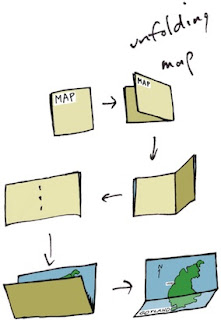
When designing, I often consider the benefit of workflow I have experienced in the past. Consider maps. When I was a kid, driving across the US in summer, I collected maps from gas stations (back when they still had them). I was trying to collect a map for each state. This is when I became familiar with the basics of functional design. A map had to be compact, and yet describe many places with sufficient accuracy for navigation.

I observed how both sides of a map were useful for different purposes. How many locations of interest were indicated with icons. A legend indicated what the icons meant. This was a time of real curiosity for me. Of essential discovery.

Such hobbies as building geodesic domes and technical illustration kept me focused on function for the longest time. But eventually, in high school, I discovered Graphis, an international magazine of graphic design. This struck a chord with my innate drawing talents. And suddenly I was also focused on form.
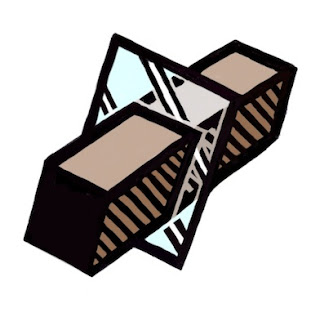
And then it was impossible function that caught my eye. At Fractal Design, I continued this design philosophy. Here is an illustration from those days, reinterpreted in my modern style that expresses form. A wooden block penetrates through glass. This is ostensibly impossible, of course, but it was in tune with my sense of materials and their simulation in UI.

At the time, I was lost in a maze of twisty passages, all alike: the labyrinth of UI design.

John Derry and I were concentrating on media, and had been since Dabbler introduced wooden drawers into paint program interfaces. Like the paint can, it was a return to the physical in design. Interfaces needed something for users to conceptually grab onto: a physical connotation that made the interface obvious to the user.

One project I was developing at the time was Headline Studio. This was an application specifically intended to create moving banners for web ads. It concentrated on moving text. So when working on a hero logotype, I sketched out these letters. The idea was that, in a static illustration, the letters might appear to be walking in. And the addition of the cursor was a functional cue. This ended up being pretty much what we used.
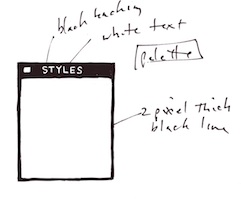
Every bit of Headline Studio was designed in minute detail. This included many designs that were not used. For instance, I show here a palette that was rejected because it was thought to be too dark.

This brings up the subject of visual cues. To visually cue the user to thinking of a palette as something to adjust the image, we chose simpler designs that those we used for windows. But sometimes we went overboard on palettes, as you know from the Painter UI design.

In the Headline Studio timeframe, we started thinking about three-dimensional UI. We considered different three-dimensional functions. For instance, we considered the window shade.
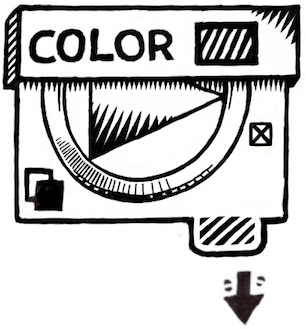

A window shade is hidden when you want to see out, and you pull it down when you want to block the view. At the time, there was a trend to make a window collapse to just its title bar when when you double-clicked it there. I considered that to be an extension of the window shade.

And by extension, we could turn palettes into window shades so their controls could be accessed only when they were needed.

Eventually this technique was replaced by the expanding list with the disclosure triangle. We liked this because when the list was closed, certain crucial data could be displayed in the list element. The user could thus discover the current state of the most important controls in a quick glance, even when the list was closed.

You get a bit of that here where the current color is displayed even when the palette is rolled up.

And like a real window shade, a small amount is shown to grab and slide down. This sort of technique would work even now in the multi-touch era.

You can also see a nod to the three-dimensional look, because the palette bar has depth. This makes it more sensible to the user that it can somehow contain the rolled-up shade.
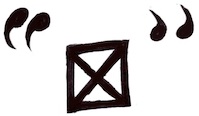
The real cost of producing a three-dimensional UI is the need to develop an visual language of controls. Take for example the humble check box.

It has been a box with an X, a box with a check coming out of it, even a simple bump that becomes a different-colored indentation. Eventually the box with the X became a close square in a typical window (though Mac OS X uses little colored balls. Which really are very nice, I think. The close ball uses an X, of course).
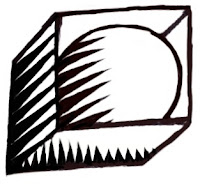
But the check box is really an on-off item. It could easily be a ball in a box that just changes color when you tap on it, for instance. On and Off? Red and Green? Or it could be a 1 and a 0.

You become endlessly mired in an array of choices when it comes to this necessary visual language. And some things just don't make sense. Eventually we came to the conclusion that objects were more useful than icons. Because the objects become more readable and their behavior is already known.

When we came to sliders, we realized that they were also used as visual indicators. Having played a pipe organ from time to time when I was a teenager, I found that drawbars might make a nice physical metaphor.
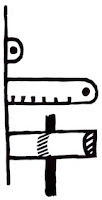
Here is a prototype for the actual sliders themselves. One of the metaphors used was like a ruler with a dot at the end. This dot marked a grab-point. You could tap and grab at that location to extend the slider to the right. This would increase its value. The marks at the bottom give you an indication of the magnitude of the slider's value. Another more drawbar-like metaphor is the glass semicylindrical rod. You can see its magnitude based on the number of lines you cross (and which refract into the rod as you drag them over).

This was an example of form leading function, but it was compelling enough to experiment with. If you turn this one into a real control, it must be possible to have several of them, like drawbars on an organ.
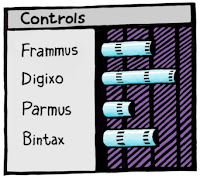
Another way to look at them is as a bar chart. Each parameter has a magnitude that is indicated by the length of the glass rod. The interface is three-dimensional, as you can see. The section to the left of the bars is thick enough for the bars to be embedded into.

Probably the inclusion of even more shadows would make it visually more interesting and also more easy and obvious to interpret.

These are re-drawings of my original sketches from 1999, colored and rendered using a woodcut look.
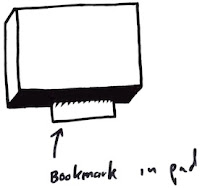
The idea of using a sticky note that sticks out of the edge of a three-dimensional pad was one simple physical construction that seemed useful. But how? In real life it is used to mark a place. Sometimes it is used to specify where in a large document you need to sign.

Either way, it was similar to a bookmark in the web: a quick way to get back to a specific place that you want to remember

The pad signifies a multi-page document, like a PDF. So, how might this be envisioned in actual use? I actually drew out a few examples. And here is one.

This shows an idea for a storyboard project. The storyboard is the multi-page document, with frames showing in sequential order. Different scenes might be marked using colored tags. The blue arrows allow the user to sequence through the pages in the normal linear ordering.

Probably the colored tags would live in small piles like a sticky pad. The user can click and drag a sticky note from the pad to tear one off and continue to drag the note to the document for use as a placeholder on the current page.

A nice, clean three-dimensional interface for non-linear access to a linear document!
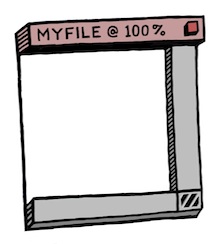
Here's another three-dimensional interface, used for a document window. It's kind of a gratuitous use of 3D though, as you can see. Still, it features an infinitely thin document, like paper, stretched in a frame made up of the scroll bars and the title bar.

Perhaps the red item in the corner is a close box.

Down in the corner is a kind of tactile device used for adjusting the window size. All of these parallel what a window has in it right now, of course, and has always had in it.

It's all about using a different visual language for the UI elements, which is something you have to choose before developing a UI in general.

Here is another, more generic example, devoid of the accoutrements of a title bar. It shows that it might be possible to put transparent stuff into an interface as well.

It is unlikely that I had any idea why I wanted a transparent element in the interfaces (I have colored it green to single it out). It is another example of form leading function.

I am still interested in how such an element can be used, though. It does look cool. It is also possible to make the document itself transparent. This might even be a nice frame for a layer in a touch environment. Consider touching the layer, and then having some controls appear around it. In this case, the three-dimensional interface makes more sense since they are like objects that appear on touch command.
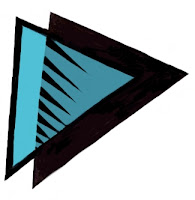
But you can consider elements like the blue arrows in the storyboard example above. They could be made transparent easily, with no real loss of readability. And that would look cool as well.

And what, I wonder, is the shadow being cast on? The elements seem to float in space in the example. It is an example of a visually interesting impossibility. If we were going for true realism, this wouldn't qualify.

And that, in a nutshell, is one of the endearing qualities of three-dimensional UI. It doesn't have to simulate something totally real. It can be magic, simply transcending reality.

The amazing thing is that, as a user, you still get it.
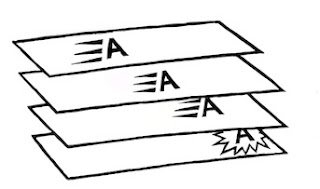
When it came to the Headline Studio packaging, I needed to come up with a way of showing animation on the box: a completely non-moving way of showing animation. I came up with several ideas, but this one stuck in my mind as a good way to show it.

Once again, three dimensional design becomes a useful tool, because it helps to replace the missing dimension of time.